

🐈 纳米机器人是一款超轻量级个人人工智能助手,灵感来源于Clawdbot
⚡️ 只需 ~4,000 行代码即可实现核心代理功能——比 Clawdbot 的 430k+ 行小了 99%。
📢 新闻
- 2026-02-01 🎉 纳米机器人发射!欢迎尝试🐈纳米机器人!
纳米机器人的关键特性:
🪶 超轻量级:仅约4000行代码——比Clawdbot核心功能小99%。
🔬 研究准备:简洁易读的代码,易于理解、修改和扩展,便于研究。
⚡️ 极快:最小的占用意味着启动更快,资源消耗更低,迭代更快。
💎 易用:一键解除多元硅,准备就绪。
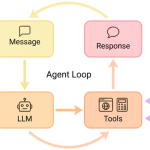
🏗️ 建筑

✨ 特色
|
📈 全天候实时市场分析 |
🚀 全栈软件工程师 |
📅 智能日常管理 |
📚 个人知识助理 |
|---|---|---|---|
|
|
|
|
|
| 发现 • 洞见 • 趋势 | 开发 • 部署 • 扩展 | 计划 • 自动化 • 组织 | 学习 • 记忆 • 推理 |


📦 安装
从源码安装(最新功能,推荐开发)
用UV安装(稳定,快速)
uv tool install nanobot-ai
从 PyPI(稳定版)安装
pip install nanobot-ai
🚀 快速入门
提示
将你的API密钥设置为 。 获取API密钥:OpenRouter(LLM)·勇者搜索(可选,用于网页搜索) 你也可以把型号换成更低成本。~/.nanobot/config.jsonminimax/minimax-m2
1. 初始化
nanobot onboard
2. 配置 (~/.nanobot/config.json)
{
  "providers": {
    "openrouter": {
      "apiKey": "sk-or-v1-xxx"
    }
  },
  "agents": {
    "defaults": {
      "model": "anthropic/claude-opus-4-5"
    }
  },
  "tools": {
    "web": {
      "search": {
        "apiKey": "BSA-xxx"
      }
    }
  }
}
3. 聊天
nanobot agent -m "What is 2+2?"
就是这样!你两分钟内就能有个可用的AI助手。
🖥️ 局部模型(vLLM)
用vLLM或任何兼容OpenAI的服务器,用自己的本地模型运行纳米机器人。
1. 启动你的虚拟语言语言模型服务器
vllm serve meta-llama/Llama-3.1-8B-Instruct --port 8000
2. 配置 (~/.nanobot/config.json)
{
  "providers": {
    "vllm": {
      "apiKey": "dummy",
      "apiBase": "http://localhost:8000/v1"
    }
  },
  "agents": {
    "defaults": {
      "model": "meta-llama/Llama-3.1-8B-Instruct"
    }
  }
}
3. 聊天
nanobot agent -m "Hello from my local LLM!"
提示
对于不需要认证的本地服务器来说,可以是任何非空字符串。apiKey
💬 聊天应用
通过Telegram或WhatsApp与你的纳米机器人交流——随时随地。
| 频道 | 设置 |
|---|---|
| 电报 | 简单(只是个代币) |
| 中等(扫描QR) |
Telegram(推荐)
1. 创建一个机器人
- 打开电报,搜索
@BotFather - 发送,跟随提示
/newbot - 复制令牌
2. 配置
{
  "channels": {
    "telegram": {
      "enabled": true,
      "token": "YOUR_BOT_TOKEN",
      "allowFrom": ["YOUR_USER_ID"]
    }
  }
}
从Telegram上获取用户ID。
@userinfobot
3. 跑
nanobot gateway
需要Node.js ≥18。
1. 连接设备
nanobot channels login
# Scan QR with WhatsApp → Settings → Linked Devices
2. 配置
{
  "channels": {
    "whatsapp": {
      "enabled": true,
      "allowFrom": ["+1234567890"]
    }
  }
}
3. 运行(两个端子)
⚙️ 配置
配置文件:~/.nanobot/config.json
提供者
注释
Groq 通过 Whisper 提供免费的语音转录服务。如果已配置,Telegram语音消息将自动转录。
| 提供者 | 目的 | 获取API密钥 |
|---|---|---|
openrouter |
LLM(推荐,所有模型都能使用) | openrouter.ai |
anthropic |
LLM(Claude 直销) | console.anthropic.com |
openai |
LLM(GPT 直交) | platform.openai.com |
groq |
LLM + 语音转录(Whisper) | console.groq.com |
gemini |
LLM(双子座直通) | aistudio.google.com |
完整配置示例
{
  "agents": {
    "defaults": {
      "model": "anthropic/claude-opus-4-5"
    }
  },
  "providers": {
    "openrouter": {
      "apiKey": "sk-or-v1-xxx"
    },
    "groq": {
      "apiKey": "gsk_xxx"
    }
  },
  "channels": {
    "telegram": {
      "enabled": true,
      "token": "123456:ABC...",
      "allowFrom": ["123456789"]
    },
    "whatsapp": {
      "enabled": false
    }
  },
  "tools": {
    "web": {
      "search": {
        "apiKey": "BSA..."
      }
    }
  }
}
CLI参考
| 指挥 | 描述 |
|---|---|
nanobot onboard |
初始化配置和工作区 |
nanobot agent -m "..." |
和代理聊聊 |
nanobot agent |
互动聊天模式 |
nanobot gateway |
启动网关 |
nanobot status |
节目现状 |
nanobot channels login |
链接WhatsApp(扫描二维码) |
nanobot channels status |
节目频道现状 |
定时任务(Cron)
🐳 Docker
在容器中构建并运行纳米机器人:
# Build the image
docker build -t nanobot .

# Initialize config (first time only)
docker run -v ~/.nanobot:/root/.nanobot --rm nanobot onboard

# Edit config on host to add API keys
vim ~/.nanobot/config.json

# Run gateway (connects to Telegram/WhatsApp)
docker run -v ~/.nanobot:/root/.nanobot -p 18790:18790 nanobot gateway

# Or run a single command
docker run -v ~/.nanobot:/root/.nanobot --rm nanobot agent -m "Hello!"
docker run -v ~/.nanobot:/root/.nanobot --rm nanobot status
📁 项目结构
nanobot/
├── agent/          # 🧠 Core agent logic
│   ├── loop.py     #    Agent loop (LLM ↔ tool execution)
│   ├── context.py  #    Prompt builder
│   ├── memory.py   #    Persistent memory
│   ├── skills.py   #    Skills loader
│   ├── subagent.py #    Background task execution
│   └── tools/      #    Built-in tools (incl. spawn)
├── skills/         # 🎯 Bundled skills (github, weather, tmux...)
├── channels/       # 📱 WhatsApp integration
├── bus/            # 🚌 Message routing
├── cron/           # ⏰ Scheduled tasks
├── heartbeat/      # 💓 Proactive wake-up
├── providers/      # 🤖 LLM providers (OpenRouter, etc.)
├── session/        # 💬 Conversation sessions
├── config/         # ⚙️ Configuration
└── cli/            # 🖥️ Commands





评论 (0)